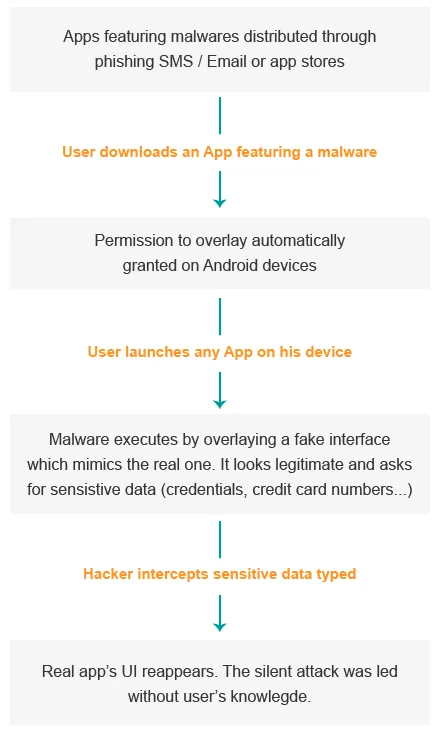
Overlay malware allows attackers to create an overlay to be displayed on top of legitimate Android applications. The overlay mimics the real app UI (User Interface) to trick users into entering sensitive data into a fake window that will collect and forward them to a remote attacker.
Overlay attacks only affect Android devices by using the SYSTEM_ALERT_WINDOW permission, which is automatically granted when apps are downloaded from the Play store. Their main purpose is to steal financial credentials without giving users a chance to notice that a malicious activity is being performed.
How it works
Focus on Marcher Android banking malware
Marcher is a malware that intercepts users’ financial credentials by overlaying banking mobile apps and payment pages. For month, it has kept evolving using new techniques and mechanism to trick users and spread infections. The amount of new Marcher variants indicates that it is an active and prevalent threat to Android devices.
Marcher starts with a phishing SMS or an Adobe Flash Player update (last variant). After being installed, the malware registers itself to a malicious server to which it sends device information and an installed apps list. Usually, Marcher waits some time before overlaying targeted apps, to avoid suspicion. Once the fake overlay pages are displayed, any credentials typed on them is sent over the server.
Marcher Android malware targets a wide range of mobile banking apps as well as the mobile payment interfaces of popular mobile applications. As soon as the overlay is displayed, the user can’t access the original app again until credentials are filled and verified.
How to prevent from an overlay attack?
- A first step is to avoid downloading applications outside official stores: the Play store provides a first level evaluation of the apps it releases to its users, which is not the case of third party stores. A great part of the applications available on those last ones are malwares.
- Verify applications’ permissions: Sometimes malwares are able to go through the Play store safety net, so make sure that permissions asked are consistent with the app’s purpose.
- And finally, never click on a suspicious link, even if it’s coming from trusted contacts.
To secure your mobile applications, discover our Application Self-Protection solution.
To protect your mobile fleet, discover our Mobile Threat Defense solution.